---
title: Can I collaborate on Legal Binders in Cleardox?
description: Make working on legal cases easier by collaborating in Cleardox. Invite colleagues as editors and keep the work moving without interruptions.
---
[Skip to content](https://academy.cleardox.io/can-i-collaborate-on-legal-binders-in-cleardox#main-content)
- [English](https://academy.cleardox.io/can-i-collaborate-on-legal-binders-in-cleardox)
- [Dansk](https://academy.cleardox.io/da/kan-jeg-samarbejde-om-legal-binders-i-cleardox)
English
Show submenu for translations
![cleardox logo mørk blå.png\]](https://academy.cleardox.io/hs-fs/hubfs/cleardox%20logo%20m%C3%B8rk%20bl%C3%A5.png?height=40&name=cleardox%20logo%20m%C3%B8rk%20bl%C3%A5.png)
Open main navigation
Close main navigation
- - [English](https://academy.cleardox.io/can-i-collaborate-on-legal-binders-in-cleardox)
- [Dansk](https://academy.cleardox.io/da/kan-jeg-samarbejde-om-legal-binders-i-cleardox)
English
Show submenu for translations
- Go to www.cleardox.io
Go to www.cleardox.io
Welcome to our Help Center. How can we help?
- There are no suggestions because the search field is empty.
1. [Cleardox Academy](https://academy.cleardox.io/?hsLang=en)
2. [Legal Binder](https://academy.cleardox.io/legal-binder?hsLang=en)
# Can I collaborate on Legal Binders in Cleardox?
## Make anonymization easier by collaborating in Cleardox. Invite colleagues as editors and keep the work moving without interruptions.
Yes, you can easily collaborate with your colleagues on anonymization in Cleardox. By adding others as **Editors** on your project, you can work together to o your binders.
This can be especially useful if you:
- have many documents that need anonymization,
- want to split the workload among several people,
- or need multiple people to quality-check the work.
This way, you can use Cleardox to streamline the process and ensure that nothing is overlooked.
#### No risk of getting “locked out”
When multiple people can work on the same project, you avoid situations where progress stalls if one user is sick or absent. Documents are not tied to a single person - instead, your colleagues can continue the work, so your project keeps moving forward and you can meet deadlines.
#### One user at a time per document or project
Even though several users can have access to the project, only one person can work in a document at a time. This ensures that changes don’t overlap or cause confusion.
#### Roles in Cleardox
When you invite a user to a project, you have two options:
- **Viewer**: Can access the project but cannot make changes.
- **Editor**: Can actively work on the project, including anonymizing documents.
If you want to collaborate on anonymization, make sure to give your colleague the **Editor** role.
#### How to invite a colleague to your project
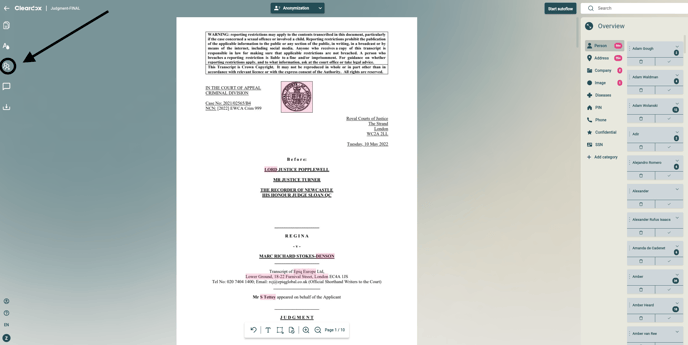
1. Click **Invite user** in the left-hand menu.
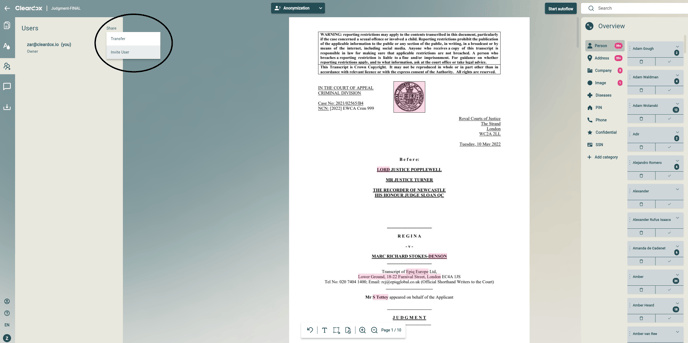
2. Select **Share** and click **Invite user**.
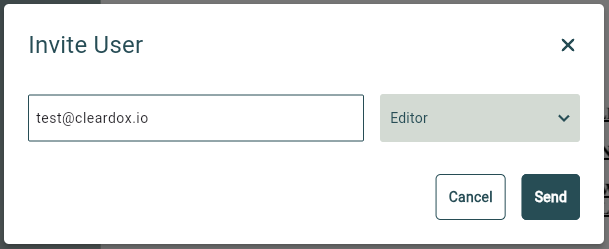
3. Enter your colleague’s email address.
4. Assign them the **Editor** role.
5. Click **Send**.
VIDEO
**Click Invite user in the left-hand menu.**
**Select Share and click Invite user.**
**Enter your colleague’s email address, assign them the Editor role, and click 'Send'**
Once you have done this, your colleague will have access to the project and can immediately start working with you.
#### Tip: Keep track of who has access
You can always view a list of who has access to your project and which roles they have. If you want to change a role or remove a user, you can do so via the same menu.
- [General](https://academy.cleardox.io/general?hsLang=en)
- [PDF Tools](https://academy.cleardox.io/pdf-tools?hsLang=en)
- [Support](https://academy.cleardox.io/support?hsLang=en)
- [Legal Binder](https://academy.cleardox.io/legal-binder?hsLang=en)
- [Cleardox Redact](https://academy.cleardox.io/cleardox-redact?hsLang=en)
[](http://Cleardox.io)
www.cleardox.io
Copyright © 2026, Cleardox ApS