---
title: Can Cleardox handle multiple cases at the same time
description: Yes, in Cleardox, it is possible to handle multiple cases at the same time without having to start over with your anonymization
---
[Skip to content](https://academy.cleardox.io/how-to-upload-documents-to-cleardox#main-content)
- [English](https://academy.cleardox.io/how-to-upload-documents-to-cleardox)
- [Dansk](https://academy.cleardox.io/da/kan-cleardox-håndtere-flere-sager-samtidig)
English
Show submenu for translations
![cleardox logo mørk blå.png\]](https://academy.cleardox.io/hs-fs/hubfs/cleardox%20logo%20m%C3%B8rk%20bl%C3%A5.png?height=40&name=cleardox%20logo%20m%C3%B8rk%20bl%C3%A5.png)
Open main navigation
Close main navigation
- - [English](https://academy.cleardox.io/how-to-upload-documents-to-cleardox)
- [Dansk](https://academy.cleardox.io/da/kan-cleardox-håndtere-flere-sager-samtidig)
English
Show submenu for translations
- Go to www.cleardox.io
Go to www.cleardox.io
Welcome to our Help Center. How can we help?
- There are no suggestions because the search field is empty.
1. [Cleardox Academy](https://academy.cleardox.io/?hsLang=en)
2. [General](https://academy.cleardox.io/general?hsLang=en)
# Can Cleardox handle multiple cases at the same time
## Yes, in Cleardox, it is possible to handle multiple cases at the same time without having to start over with your anonymization
Uploading documents is the first step when working in Cleardox — whether you're preparing files for **redaction** or building a **Legal Binder**.
In this guide, you'll learn how to upload and work in multiple cases simultaniously, and begin working with them in your preferred workflow.
### How to Upload Documents to Cleardox
In Cleardox, uploading documents is simple and flexible.
You can upload documents when you want to:
- Redact or pseudonymize sensitive information
- Organize files into a Legal Binder
- Prepare case materials for review or submission
- Work with multiple documents at once
Each uploaded document becomes part of your workspace, where you can continue with either redaction or Legal Binder preparation.
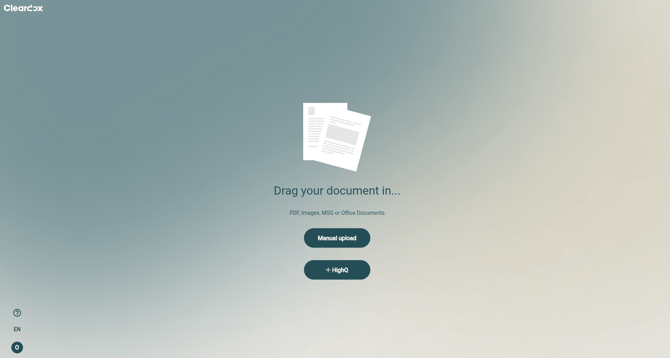
There are two easy ways to upload documents in bulk into Cleardox.
#### Option 1: Drag and Drop (Recommended)
1. Log in to Cleardox
2. Drag your files directly into the upload area
3. Release the files to begin uploading
Your documents will appear immediately and be ready for processing.
#### Option 2: Upload Manually
If drag-and-drop is not available, you can upload manually:
1. Click **Manual upload**
2. Select the documents from your computer
3. Confirm your selection
Your files will then be added to your workspace.
It's also possible to upload a .zip-file with all relevant documents-
Each document represents an individual case in Cleardox, and you can then work on multiple cases simultaneously.
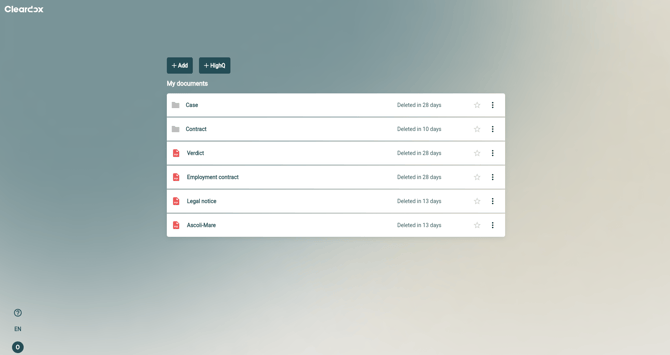
Should you log out and return later, Cleardox efficiently tracks your progress. This ensures that you can confidently begin working on a project and complete it the following day, making use of our software.
- [General](https://academy.cleardox.io/general?hsLang=en)
- [PDF Tools](https://academy.cleardox.io/pdf-tools?hsLang=en)
- [Support](https://academy.cleardox.io/support?hsLang=en)
- [Legal Binder](https://academy.cleardox.io/legal-binder?hsLang=en)
- [Cleardox Redact](https://academy.cleardox.io/cleardox-redact?hsLang=en)
[](http://Cleardox.io)
www.cleardox.io
Copyright © 2026, Cleardox ApS
```json
{
"@context" : "https://schema.org",
"@type" : "VideoObject",
"contentUrl" : "https://143694209.fs1.hubspotusercontent-eu1.net/hubfs/143694209/Cleardox_multiple%20cases.mp4",
"dateModified" : "2024-07-11T09:27:18.047Z",
"duration" : "PT2M58.976S",
"height" : 2160,
"name" : "Cleardox_multiple cases",
"thumbnailUrl" : "https://143694209.fs1.hubspotusercontent-eu1.net/hubfs/143694209/Cleardox_multiple%20cases.mp4/medium.jpg",
"uploadDate" : "2024-07-10T11:53:54.652Z",
"width" : 3840
}
```