---
title: How do I customize Cleardox to suit my redaction scenario?
description: Learn how to customize Cleardox to match your specific redaction needs. Discover how to choose your preferred redaction method, deactivate unnecessary categories, and create your own custom categories for efficient document anonymization
---
[Skip to content](https://academy.cleardox.io/how-do-i-customize-cleardox-to-suit-my-anonymization-scenario#main-content)
- [English](https://academy.cleardox.io/how-do-i-customize-cleardox-to-suit-my-anonymization-scenario)
- [Dansk](https://academy.cleardox.io/da/hvordan-tilpasser-jeg-cleardox-så-det-passer-til-mit-anonymiseringsscenarie)
English
Show submenu for translations
![cleardox logo mørk blå.png\]](https://academy.cleardox.io/hs-fs/hubfs/cleardox%20logo%20m%C3%B8rk%20bl%C3%A5.png?height=40&name=cleardox%20logo%20m%C3%B8rk%20bl%C3%A5.png)
Open main navigation
Close main navigation
- - [English](https://academy.cleardox.io/how-do-i-customize-cleardox-to-suit-my-anonymization-scenario)
- [Dansk](https://academy.cleardox.io/da/hvordan-tilpasser-jeg-cleardox-så-det-passer-til-mit-anonymiseringsscenarie)
English
Show submenu for translations
- Go to www.cleardox.io
Go to www.cleardox.io
Welcome to our Help Center. How can we help?
- There are no suggestions because the search field is empty.
1. [Cleardox Academy](https://academy.cleardox.io/?hsLang=en)
2. [Cleardox Redact](https://academy.cleardox.io/cleardox-redact?hsLang=en)
# How do I customize Cleardox to suit my redaction scenario?
## Learn how to customize Cleardox to match your specific redaction needs. Discover how to choose your preferred redaction method, deactivate unnecessary categories, and create your own custom categories for efficient document anonymization
Cleardox is a modular anonymization and redaction software tool that automatically adapts to the individual user's anonymization or redaction scenario.
There are many different ways to anonymize documents and various reasons for doing so. Some prefer to anonymize by pseudonymizing, preserving the knowledge, while others prefer anonymization with black redaction - classic anonymization.
Furthermore, some need to anonymize primarily according to GDPR, thereby hiding all direct and indirect personal data, while others primarily anonymize to hide state or business secrets.
### You have the following customization options in Cleardox:
1. **Choose Anonymization Method**:
- Choose whether Cleardox should anonymize using pseudonymization or black redaction - read the article [here](https://academy.cleardox.io/how-to-anonymize-or-redact-using-traditional-black-lining-instead-pseudonymization?hsLang=en).
2. **Deactivate Categories**:
- Choose if there are categories that should be completely deactivated.
3. **Create Your Own Categories**:
- Create your own categories with custom searches - read the article [here](https://academy.cleardox.io/can-i-create-my-own-anonymization-/-redaction-categories-in-cleardox?hsLang=en)
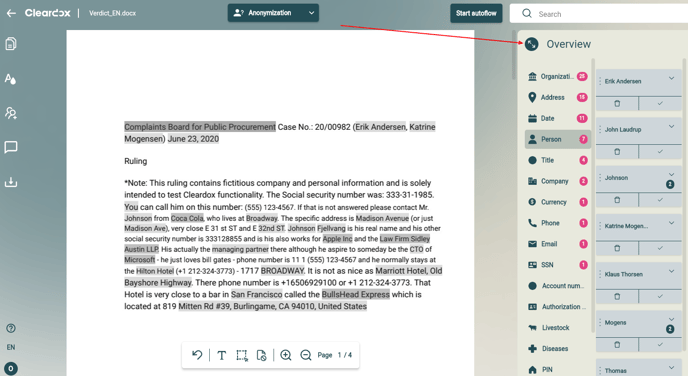
Customizations are made by opening the side panel on the left. From there, you will enter the overview menu.
### 
### Deactivate Categories
1. **Open the Side Panel** as shown above.
2. **Select the Category** you want to deactivate (e.g., organizations).
3. **Click on the three dots**: Select "Deactivate."
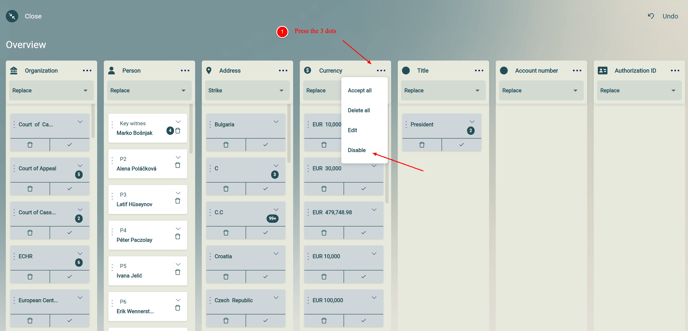
The category is now permanently deactivated until you reactivate it.
**Note:** Cleardox will still search for content in this category. The content will simply not be presented as an anonymization suggestion in the documents.
### Activate Deactivated Anonymization Categories
1. **Open the Side Panel** as shown above.
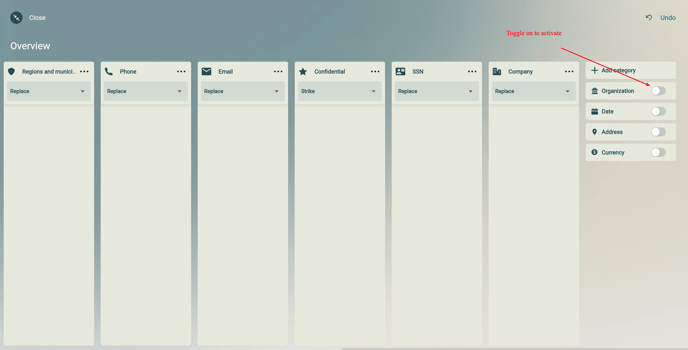
2. **Scroll to the Right** in the dashboard.
3. **Reactivate Categories** using the toggle function.
- [General](https://academy.cleardox.io/general?hsLang=en)
- [PDF Tools](https://academy.cleardox.io/pdf-tools?hsLang=en)
- [Support](https://academy.cleardox.io/support?hsLang=en)
- [Legal Binder](https://academy.cleardox.io/legal-binder?hsLang=en)
- [Cleardox Redact](https://academy.cleardox.io/cleardox-redact?hsLang=en)
[](http://Cleardox.io)
www.cleardox.io
Copyright © 2026, Cleardox ApS
```json
{
"@context" : "https://schema.org",
"@type" : "VideoObject",
"contentUrl" : "https://143694209.fs1.hubspotusercontent-eu1.net/hubfs/143694209/Cleardox%20-%20Pseudonymize_En.mp4",
"dateModified" : "2026-06-10T09:52:16.996Z",
"duration" : "PT5M54.941S",
"height" : 2160,
"name" : "Cleardox - 11 July 2024-2",
"thumbnailUrl" : "https://143694209.fs1.hubspotusercontent-eu1.net/hubfs/143694209/Cleardox%20-%20Pseudonymize_En.mp4/medium.jpg",
"uploadDate" : "2024-07-11T09:35:52.059Z",
"width" : 3840
}
```